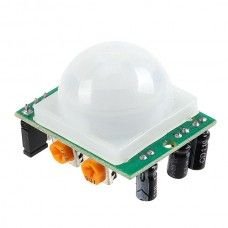
Overview
The PIR Motion Sensor is an essential component for any project that requires motion detection. Utilizing passive infrared technology, it detects changes in infrared radiation, making it effective for sensing human movement. This sensor is widely used in security systems, automatic lighting, and smart home applications.
What's in the box
- PIR Motion Sensor
- Mounting hardware
- User manual
Key features
- Passive infrared detection technology
- Wide detection range of up to 7 meters
- Adjustable sensitivity and delay time
- Low power consumption for battery-operated projects
- Compatible with Arduino and Raspberry Pi
- Compact and lightweight design
- Easy to install and use
How it works
The PIR Motion Sensor detects motion by measuring changes in infrared radiation emitted by objects in its field of view. When a warm body, such as a human, moves within the sensor's range, it triggers a signal that can be used to activate alarms, lights, or other devices. The sensor has two slots that detect the infrared radiation, allowing it to sense movement based on the difference in radiation levels.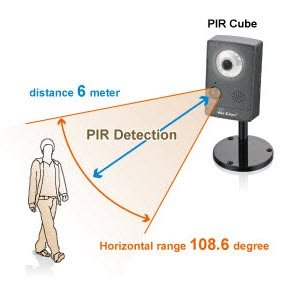
Getting started
- Connect the PIR Motion Sensor to your microcontroller (e.g., Arduino or Raspberry Pi) using jumper wires.
- Power the sensor using the appropriate voltage (typically 5V).
- Upload the sample code provided in the user manual to your microcontroller.
- Adjust the sensitivity and delay settings as needed.
- Test the sensor by moving in front of it to see if it detects motion.
Wiring / connections
The PIR Motion Sensor typically has three pins: VCC (power), GND (ground), and OUT (signal). Connect the VCC pin to the 5V output of your microcontroller, the GND pin to the ground, and the OUT pin to a digital input pin on your microcontroller to read the motion signal.
Tips & troubleshooting
- Ensure the sensor is mounted in a location with a clear line of sight.
- Adjust the sensitivity potentiometer to increase or decrease the detection range.
- Check all connections if the sensor does not respond as expected.
- Test the sensor in different environments to find the optimal placement.
Safety notes
Always handle electronic components with care. Avoid exposing the sensor to extreme temperatures or moisture to ensure longevity and proper functionality.