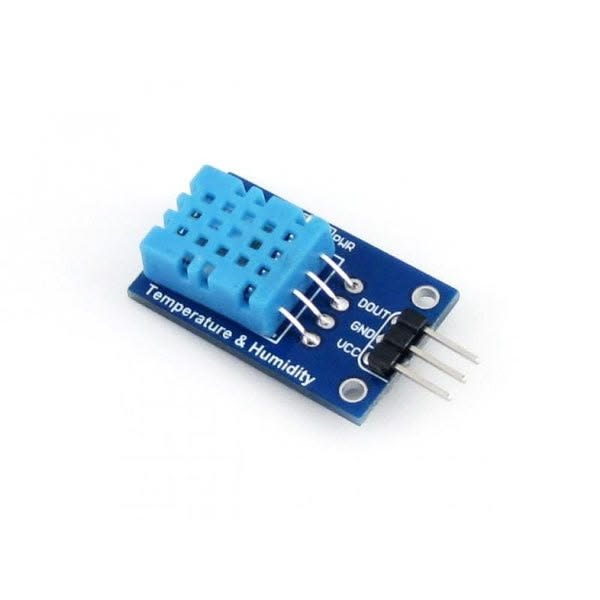
Overview
The DHT11 sensor is designed to measure both temperature and humidity with high accuracy. It provides a digital signal output, which makes it easy to interface with microcontrollers such as Arduino and Raspberry Pi. This sensor is a great choice for anyone looking to incorporate environmental data into their electronic projects.
What's in the box
- DHT11 Sensor Module
- Connecting Wires
- User Manual
Key features
- Measures temperature from 0 to 50°C
- Measures humidity from 20% to 90% RH
- Digital output for easy interfacing
- Low power consumption
- Compact and lightweight design
- Compatible with most microcontrollers
How it works
The DHT11 sensor uses a capacitive humidity sensor and a thermistor to measure the surrounding temperature and humidity. The sensor then outputs a digital signal that can be read by a microcontroller. This allows you to easily integrate the sensor into your projects and retrieve real-time environmental data.
Getting started
- Connect the DHT11 sensor to your microcontroller using the provided wires.
- Install the necessary libraries for your microcontroller (e.g., DHT library for Arduino).
- Write a simple program to read data from the sensor.
- Upload the program to your microcontroller.
- Monitor the temperature and humidity readings in your serial monitor.
Wiring / connections
Connect the DHT11 sensor as follows:
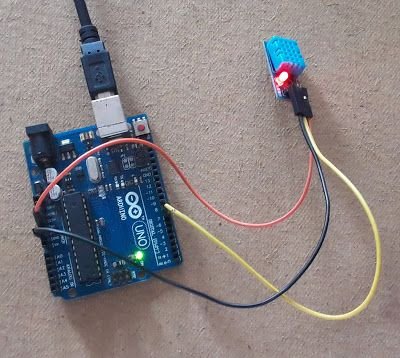
- VCC to 5V power supply
- GND to ground
- Data pin to a digital pin on your microcontroller
Tips & troubleshooting
- Ensure proper connections to avoid inaccurate readings.
- Keep the sensor away from direct sunlight for accurate temperature readings.
- Use pull-up resistors if necessary for the data line.
Safety notes
Handle the sensor with care and avoid exposing it to moisture or extreme temperatures.